I will give a little bit breaking down about 3D animation.
You can use Blender; my biggest advice is to use Blender if you want to learn 3D animation. Don't go to MMD, or Maya, but if you have money, you can go to Maya. Because you spend money on Maya, it means you want to focus on 3D, and Maya is the industry standard; most studios use Maya more than Blender.
Maya and Blender have the same workflow, but MMD is different.
For the character model, you can use the Blender kit, or maybe if you love Genshin or other Hoyoverse games, they share the model for free. What you need to do is convert the PMX model into Blender; it's easy, and there are a bunch of tutorials on YouTube.
I use the March Model from Star Rail.
First, find an animation reference: it can be a real-life video, a song, a viral video, or a meme. Basically, Animation isn't creating life but recreating life.
My reference is Money on the Dash, but I don't follow exactly the animation of the video; I just use the flow as a reference.
Second, start to pose the key pose. It's called Blocking. Blocking is an animation technique in which key poses are created to establish the timing and placement of characters and props in a given scene or shot.
Because Money on the Dash is a walk cycle, it has a few poses, mostly 2 key poses, and there is a cheat.


That's the first pose. However, as we make a pose, we need to consider what the best pose is. The best pose has a great silhouette, a great counterpose, and a great line of action. You can see the second image above; the red line is the counterpose of the character. Hips, shoulders, and head have different tilts. The blue line is the opposing action; basically, when the hips face 45 degrees, the chest doesn't face in the same direction as the hips; it must face in a different direction. Same with the head. You can see in the third image that the head, the chest, and the hips (COG) face in different directions. After that, you copy all the bones or the pose and paste them into a flip; that's the cheat. Now I have the breakdown of the Money on the Dash in my own style.

The foot is sliding, and they are clipping each other. Yes, I cheat. Making a walk cycle, there are 5 parts: Contact, Low, Passing, High, and Contact.

In my way, I don't want to block or make key poses for Low, Passing, and High, because those poses would be automatically made in the next part.
After blocking is done, the next part is blocking plus. What is blocking plus? It's like adding in-between, like 2D, but in 3D.
Basically, I need to add another pose in the middle of those two poses. However, this pose, I won't count as a keyframe or pose but a breakdown, yet it acts as neutral.

What is a breakdown? Breakdown is a pose that is usually the opposing action of the previous and the following poses. Breakdowns allow the animator to create a smooth and natural transition between keyframes; mostly, they will create an arc. What is arc? Arc is a visual path of action.


The left is an arc of blocking only; the right is an arc with one breakdown. You can see the difference in the visual path. Mostly animations follow a parabolic arc. When you use MMD, they usually finish by this. However, we can go further. I want to make the movement stylized, which is fluid. So I added another breakdown. Why? Because of the shoulder, most MMDs have rigid shoulder, upper arm, and head movement.
The best advice from my lecturer and former supervisor is, "Don't make any body part/bone feel static or like being chained. Make it relaxed, and bring the character."


So basically, you are moving and hearing the music, so your head and your shoulder must follow the melody of the music, like grooving. The arc will be different, but that arc has great density, which means the movement isn't floaty but snappy. Floaty movement is where the pose timing is so stretched, and the movement is like slow motion or floating.
Firstly, in 3D, there isn't any In-between like in 2D, so usually to fulfill the timing or the between pose, I mostly use a breakdown because in 3D they use bezier movement basically; the between poses are already generated by the computer.
Breakdowns show how (slowly, angrily, passionately) the character moves from one key to the next. Inbetweens are 'in between' all the others, usually halfway between the drawings on either side. In other words, 3D doesn't have in-betweens.
How do you do a breakdown?
Breakdown in 3D is easier than in 2D. Basically, what you need to do is bring some body parts like shoulders, chests, COGs, hips, heads, and squashes down or up.
There are three types of breakdown: Breakdown Down, Breakdown Up, and mixed breakdown. I used the mix to make the movement fluid.
"Breakdown" is used based on the character; for example, if the character wants to jump, the breakdown must be "Breakdown Down," because before jumping, having Breakdown Down will make it more fluid and mostly will become a supporter of anticipation, like a parabola.


Those are the breakdowns; the first one is a Breakdown Down. You just rotate some body parts down: chest, head, squats, shoulders, hands, eyes, eyebrows, and hips. The second breakdown is a Breakdown Up, the opposite of Breakdown Down. Yet breakdown can be a different rotation; it can be rotated left or right, basically, it's usually the opposite action of the previous pose and the following pose.
And there you go; I have an animation of Money on the Dash in my own style.

However, you can push it again into the next part. It's Spline.
Spline is the last part; it's simple but needs meticulousness. Basically, you add an overlapping action to the animation. What is overlapping?
Overlapping for me is the magic of animation; an animation without overlapping is rigid, not fluid. Basically, overlapping is an idea that different parts of a body or object will move at different speeds. Some body parts of humans have different frames of speed in 3D. In 3D, overlapping is easier than in 2D, because in 2D, you need to think about the overlap and draw it. However, in 3D, you just move the frames.

So the anchor of animation is in the COG (Centre of Gravity), basically, that's the anchor of the frame. If the COG starts at frame 1, then some body parts mustn't start at frame 1. For example, I usually follow the basics of overlap, basically the shoulders, chest, and upper arm, delay 1 frame from the COG. Head, wrist, and fingers delay 3 frames from the COG. Lower arm delays 2 frames from the COG. Squash delays 4 frames from the COG. With this, some body parts have different movement speeds.
However, when I saw the result above, there was something that was a little bothersome in my head. It was the hips. Basically, the hips and chest have the same movement. Yet, what happens if the hips move more slowly than others? Basically, when the feet step on the ground, the hips are still in the process of swaying. After the feet are lifted, the hips finish swaying. Like dancing, mostly you move the chest first and then the hips.

After that, you just check the graph of the animation. It's an important part. when you see an animation that has jittering, for example...
It used MMD, but the concept is still the same. The reason why the animation from that creator is jittering is that the graph isn't right if it's in Blender.
The graph should be parabolic.

What happens if it isn't parabolic, and what type of graph makes it jittery?

Basically, when the graph is like a cliff, it is mostly jittery. Let the graph be relaxed, having some space, and being parabolic.
Or there are too many poses. Basically, 3D isn't the same as 2D. In 2D, you draw a lot, and the animation becomes smooth, yet in 3D, you pose a lot, and the animation becomes jittery. That's why there are blocking and blocking plus, where you just pose the key pose.
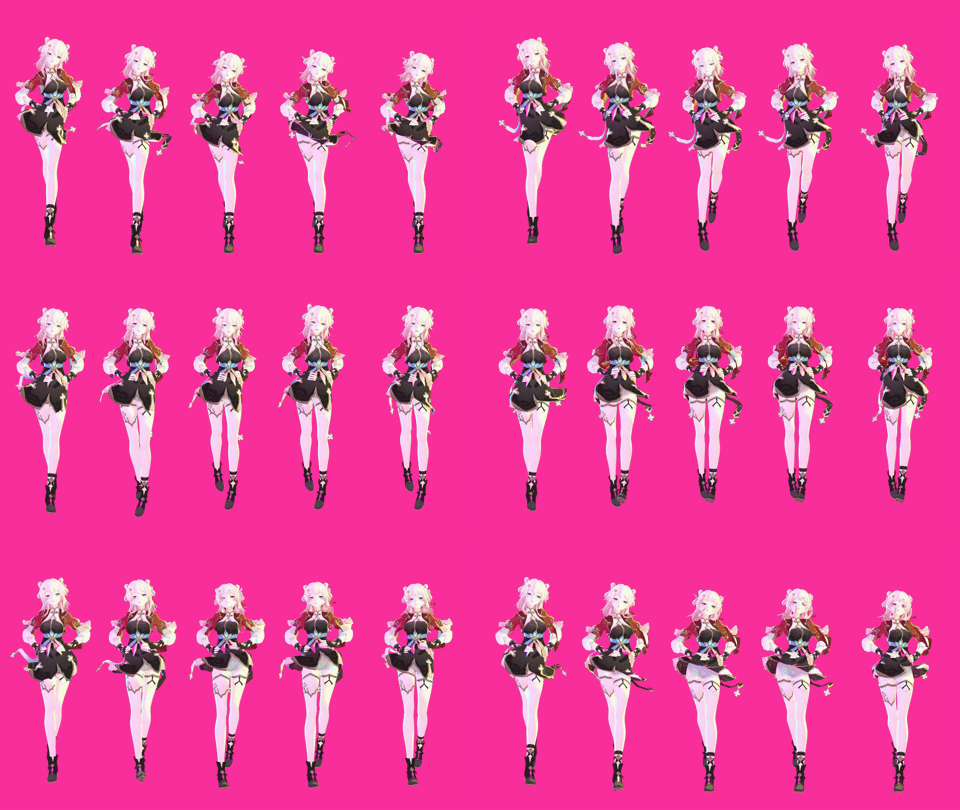
I think that's it. Basically, 3D animation is much simpler than 2D animation. Blocking, fewer poses. Blocking Plus, breakdown Down, Up, or mix. Spline, overlapping, and checking graphs. It's harder if you don't have a reference for animation; you can animate everything basically. Your own video, viral video, meme, music, etc. The model and the tool are free to grab.
This is the easiest way to spot the difference between the blocking, the blocking plus, and the spline.
I make 2 simple poses.

Blocking is so floaty, yet when I add breakdowns, it becomes more snappy.
3D is simpler but more technical, yet there are a lot of ways to achieve smooth and fluid animation (cheats, shortcuts, etc.), and the fundamentals must be the same. Most importantly, see and feel the movement.
Have a nice day.
You can use Blender; my biggest advice is to use Blender if you want to learn 3D animation. Don't go to MMD, or Maya, but if you have money, you can go to Maya. Because you spend money on Maya, it means you want to focus on 3D, and Maya is the industry standard; most studios use Maya more than Blender.
Maya and Blender have the same workflow, but MMD is different.
For the character model, you can use the Blender kit, or maybe if you love Genshin or other Hoyoverse games, they share the model for free. What you need to do is convert the PMX model into Blender; it's easy, and there are a bunch of tutorials on YouTube.
I use the March Model from Star Rail.
First, find an animation reference: it can be a real-life video, a song, a viral video, or a meme. Basically, Animation isn't creating life but recreating life.
My reference is Money on the Dash, but I don't follow exactly the animation of the video; I just use the flow as a reference.
Second, start to pose the key pose. It's called Blocking. Blocking is an animation technique in which key poses are created to establish the timing and placement of characters and props in a given scene or shot.
Because Money on the Dash is a walk cycle, it has a few poses, mostly 2 key poses, and there is a cheat.
That's the first pose. However, as we make a pose, we need to consider what the best pose is. The best pose has a great silhouette, a great counterpose, and a great line of action. You can see the second image above; the red line is the counterpose of the character. Hips, shoulders, and head have different tilts. The blue line is the opposing action; basically, when the hips face 45 degrees, the chest doesn't face in the same direction as the hips; it must face in a different direction. Same with the head. You can see in the third image that the head, the chest, and the hips (COG) face in different directions. After that, you copy all the bones or the pose and paste them into a flip; that's the cheat. Now I have the breakdown of the Money on the Dash in my own style.
The foot is sliding, and they are clipping each other. Yes, I cheat. Making a walk cycle, there are 5 parts: Contact, Low, Passing, High, and Contact.
In my way, I don't want to block or make key poses for Low, Passing, and High, because those poses would be automatically made in the next part.
After blocking is done, the next part is blocking plus. What is blocking plus? It's like adding in-between, like 2D, but in 3D.
Basically, I need to add another pose in the middle of those two poses. However, this pose, I won't count as a keyframe or pose but a breakdown, yet it acts as neutral.
What is a breakdown? Breakdown is a pose that is usually the opposing action of the previous and the following poses. Breakdowns allow the animator to create a smooth and natural transition between keyframes; mostly, they will create an arc. What is arc? Arc is a visual path of action.
The left is an arc of blocking only; the right is an arc with one breakdown. You can see the difference in the visual path. Mostly animations follow a parabolic arc. When you use MMD, they usually finish by this. However, we can go further. I want to make the movement stylized, which is fluid. So I added another breakdown. Why? Because of the shoulder, most MMDs have rigid shoulder, upper arm, and head movement.
The best advice from my lecturer and former supervisor is, "Don't make any body part/bone feel static or like being chained. Make it relaxed, and bring the character."
So basically, you are moving and hearing the music, so your head and your shoulder must follow the melody of the music, like grooving. The arc will be different, but that arc has great density, which means the movement isn't floaty but snappy. Floaty movement is where the pose timing is so stretched, and the movement is like slow motion or floating.
Firstly, in 3D, there isn't any In-between like in 2D, so usually to fulfill the timing or the between pose, I mostly use a breakdown because in 3D they use bezier movement basically; the between poses are already generated by the computer.
Breakdowns show how (slowly, angrily, passionately) the character moves from one key to the next. Inbetweens are 'in between' all the others, usually halfway between the drawings on either side. In other words, 3D doesn't have in-betweens.
How do you do a breakdown?
Breakdown in 3D is easier than in 2D. Basically, what you need to do is bring some body parts like shoulders, chests, COGs, hips, heads, and squashes down or up.
There are three types of breakdown: Breakdown Down, Breakdown Up, and mixed breakdown. I used the mix to make the movement fluid.
"Breakdown" is used based on the character; for example, if the character wants to jump, the breakdown must be "Breakdown Down," because before jumping, having Breakdown Down will make it more fluid and mostly will become a supporter of anticipation, like a parabola.
Those are the breakdowns; the first one is a Breakdown Down. You just rotate some body parts down: chest, head, squats, shoulders, hands, eyes, eyebrows, and hips. The second breakdown is a Breakdown Up, the opposite of Breakdown Down. Yet breakdown can be a different rotation; it can be rotated left or right, basically, it's usually the opposite action of the previous pose and the following pose.
And there you go; I have an animation of Money on the Dash in my own style.
However, you can push it again into the next part. It's Spline.
Spline is the last part; it's simple but needs meticulousness. Basically, you add an overlapping action to the animation. What is overlapping?
Overlapping for me is the magic of animation; an animation without overlapping is rigid, not fluid. Basically, overlapping is an idea that different parts of a body or object will move at different speeds. Some body parts of humans have different frames of speed in 3D. In 3D, overlapping is easier than in 2D, because in 2D, you need to think about the overlap and draw it. However, in 3D, you just move the frames.
So the anchor of animation is in the COG (Centre of Gravity), basically, that's the anchor of the frame. If the COG starts at frame 1, then some body parts mustn't start at frame 1. For example, I usually follow the basics of overlap, basically the shoulders, chest, and upper arm, delay 1 frame from the COG. Head, wrist, and fingers delay 3 frames from the COG. Lower arm delays 2 frames from the COG. Squash delays 4 frames from the COG. With this, some body parts have different movement speeds.
However, when I saw the result above, there was something that was a little bothersome in my head. It was the hips. Basically, the hips and chest have the same movement. Yet, what happens if the hips move more slowly than others? Basically, when the feet step on the ground, the hips are still in the process of swaying. After the feet are lifted, the hips finish swaying. Like dancing, mostly you move the chest first and then the hips.
After that, you just check the graph of the animation. It's an important part. when you see an animation that has jittering, for example...
The graph should be parabolic.
What happens if it isn't parabolic, and what type of graph makes it jittery?
Basically, when the graph is like a cliff, it is mostly jittery. Let the graph be relaxed, having some space, and being parabolic.
Or there are too many poses. Basically, 3D isn't the same as 2D. In 2D, you draw a lot, and the animation becomes smooth, yet in 3D, you pose a lot, and the animation becomes jittery. That's why there are blocking and blocking plus, where you just pose the key pose.
I think that's it. Basically, 3D animation is much simpler than 2D animation. Blocking, fewer poses. Blocking Plus, breakdown Down, Up, or mix. Spline, overlapping, and checking graphs. It's harder if you don't have a reference for animation; you can animate everything basically. Your own video, viral video, meme, music, etc. The model and the tool are free to grab.
This is the easiest way to spot the difference between the blocking, the blocking plus, and the spline.
I make 2 simple poses.
Blocking is so floaty, yet when I add breakdowns, it becomes more snappy.
3D is simpler but more technical, yet there are a lot of ways to achieve smooth and fluid animation (cheats, shortcuts, etc.), and the fundamentals must be the same. Most importantly, see and feel the movement.
Have a nice day.