Can we please add a "Stay on Page" function for the text editor?

Lysander_Works

Well-known member
Joined
Jul 22, 2023
Messages
596
Points
103
*Rant*

I'm just ticked off cause I dropped my mouse, it landed and clicked the red X on my browser with 3 tabs opened, and lost 1 hour of work. Wasn't prompted to leave site or not which would have saved lots of grief. Didn't expect it tbh.
 

Lysander_Works

Well-known member
Joined
Jul 22, 2023
Messages
596
Points
103
I think it would be easier to add some sort of an autosaver. Maybe a customizable one.
It would have to be highly customizable to be useful. I've had autosavers destroy hours of work too, unintentionally.
Some browsers come with this baked in, but mine doesn't work of course.
 

jrell

Well-known member
Joined
Sep 6, 2023
Messages
86
Points
73
It happened to me as well. It sucks. Since then, I've been using a Chrome extension that automatically saves everything I write: Textarea Cache.
To save space on your device, make sure to set a maximum age for your content in the settings. Mine is set to seven days.

Additionally, while we are on the topic of the text editor, I'd like to point out how the "Save draft" and "Publish" buttons are so close to each other, yet we don't have an "Are you sure?" window to prevent accidental clicks. It would be really helpful to have a confirmation window to make sure users don't accidentally publish content when they actually meant to save it as a draft.
 

Lysander_Works

Well-known member
Joined
Jul 22, 2023
Messages
596
Points
103
It happened to me as well. It sucks. Since then, I've been using a Chrome extension that automatically saves everything I write: Textarea Cache.
To save space on your device, make sure to set a maximum age for your content in the settings. Mine is set to seven days.

Additionally, while we are on the topic of the text editor, I'd like to point out how the "Save draft" and "Publish" buttons are so close to each other, yet we don't have an "Are you sure?" window to prevent accidental clicks. It would be really helpful to have a confirmation window to make sure users don't accidentally publish content when they actually meant to save it as a draft.

I need a better browser in general. Should of looked for one a while ago. Big L to chrome though for not having that feature by default.

Isn't there an "Unpublish button baked into the settings somewhere?"
If not, I better be careful. Really a confirmation of leaving the tab and for publishing would be the easiest solution to me. Cant see the downside to that.
Iirc don't browsers have an option for "confirmation before quiting" in the settings
Some do and some dont, and few do but doesn't work anyway. That's why I'd want the feature on the site.
 

ThatTwat3000

Well-known member
Joined
Jun 2, 2024
Messages
150
Points
108
*Rant*

I'm just ticked off cause I dropped my mouse, it landed and clicked the red X on my browser with 3 tabs opened, and lost 1 hour of work. Wasn't prompted to leave site or not which would have saved lots of grief. Didn't expect it tbh.
It happened to me as well. It sucks. Since then, I've been using a Chrome extension that automatically saves everything I write: Textarea Cache.
To save space on your device, make sure to set a maximum age for your content in the settings. Mine is set to seven days.

Additionally, while we are on the topic of the text editor, I'd like to point out how the "Save draft" and "Publish" buttons are so close to each other, yet we don't have an "Are you sure?" window to prevent accidental clicks. It would be really helpful to have a confirmation window to make sure users don't accidentally publish content when they actually meant to save it as a draft.
I thought there was a cookie cache already implemented... Maybe I’m remembering it wrong, or it’s another webpage :blob_hmm:
 

Piisfun

Playful Spacetime Dragon
Joined
Jun 2, 2020
Messages
474
Points
133
It would have to be highly customizable to be useful. I've had autosavers destroy hours of work too, unintentionally.
Some browsers come with this baked in, but mine doesn't work of course.
Nope, the only event handler that can block closing the tab by accident has a fixed browser-generated prompt.

It basically spawns a pop-up saying "Are you sure you are finished?" and gives you the option to cancel closing the page, or continue.

This:
 

Lysander_Works

Well-known member
Joined
Jul 22, 2023
Messages
596
Points
103
Nope, the only event handler that can block closing the tab by accident has a fixed browser-generated prompt.

It basically spawns a pop-up saying "Are you sure you are finished?" and gives you the option to cancel closing the page, or continue.

This:

This is gonna end up being on of those things we have to manually code into the browser, isn't it...
 

3guanoff

Well-known memoir
Joined
Jul 14, 2023
Messages
370
Points
133
This is gonna end up being on of those things we have to manually code into the browser, isn't it...
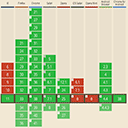
Let's suppose you miraculously did add a custom feature to all modern web browsers, it would still take time for users to update their browsers. You are better off using beforeunload, it has decent support:

I have seen websites that do some textarea versioning. They autosave your input every ten minutes and when you leave/hide the page (usually with page vis not beforeunload), and then offer you all those versions to restore from. Of course, this needs to be implemented well and with decent limitations or it can be exploited.

I doubt such an addition is worth the effort. Better for users to get a browser add-on or a local text editor.
 
Top